
Are you looking for the best newsletter software out there for your campaigns?
No single newsletter software is “the best of them all.” There’s only the software that’s best for you… And we’re here to help you find which one is best aligned with your specific marketing needs.
So, let’s dig into the best newsletter platforms on the market and make your job a little easier.
First, what is an email newsletter software?
In short, newsletter software helps you build a contact list, then design, create, and send newsletters to that list.
Most platforms also include advanced features like landing pages, signup forms, popups, automation, and an analytics dashboard. In other words, they give you everything you need to grow multiple audiences and communicate with them at scale. All while using personalized emails and professional designs.
And best of all, you can do it without the hassle of sending and personalizing emails manually for hundreds (or thousands) of contacts.
Now that we’ve covered what email newsletter software is, let’s look at the best newsletter platforms and see which one fits your business needs.
(TL; DR) 12 best email newsletter tools
Disclaimer: The order in which these newsletter platforms are listed does not reflect any ranking from best to worst. We encourage you to choose the platform based on your use case and budget and not the order in which these are listed.
| Provider | Best for | Strength(s) | Pricing |
|---|---|---|---|
| GetResponse | Comprehensive online marketing campaigns | Advanced email builder with AI, multi-channel capabilities | Free for 500 contacts and then starts at $15.58/month – Pricing page |
| Mailchimp | Beginners and small teams | Team collaboration features, Canva integration | Free for 250 contacts and then starts at $20/month – Pricing page |
| Sender | Startups and SMBs | Drag-and-drop email builder, responsive templates, automation workflows | Free for 2,500 contacts and then starts at $7/month – Pricing page |
| Moosend | SMBs and scaling teams that want email marketing and automation on a budget | Intuitive no-code email editor with designer-made templates Visual automation workflows for scheduled and behavior-based sends | Free 30-day trial. Paid plans start at $9/month. – Pricing page |
| Campaign Monitor | Personalized email campaigns | Easy content personalization | Free 30-day trial (sending is limited during the trial). Paid plans: Lite, Essentials, Premier—see Pricing page |
| Omnisend | Ecommerce brands | Advanced features without a luxury price tag | Free then starts at $16/month – Pricing page |
| Kit | Creators and influencers | Built-in commerce solutions, intuitive popup builder | Free for 1 email sequence and then starts at $15/month – Pricing page |
| Constant Contact | Event promotion | Event promotion tools, error checker | 30-day free trial and then $12/month – Pricing page |
| MailerLite | Cost-effective solutions | Intuitive form and email builder | Free for up to 500 subscribers and then starts at $10/month – Pricing page |
| Brevo | Multichannel marketing | Multichannel capabilities, customizable templates | Free for up to 300 emails/day then starts at $9/month – Pricing page |
| AWeber | Small businesses with limited design resources | Smart designer tool | Free for up to 500 contacts and then $15/month – Pricing page |
| HubSpot | Small business owners & bloggers | Templates, drag and drop builder, tracking | Free tools available (newsletter builder is free). Paid plans start from $20/month – Pricing page |
Author’s note:
This comparison is accurate on February 2026. We do our best to keep it as accurate as possible, and we check it on a regular basis, however, if you want to acquaint yourself with the offer of our competitors, you should check it at their official website or contact their representatives.
Whenever we want to evaluate and test apps, we give our team members access to a paid account of the app they are reviewing to let them test all the relevant features to get useful insights.
List of our 12 favorite newsletter tools
1. GetResponse
Ideal for businesses looking for an email marketing tool with advanced automation, multi-channel capabilities, and 24/7 customer support.
Key features
The GetResponse email marketing tool includes nine core features to help you craft the right type of email:
- Email creator that lets you design beautiful messages with stunning prebuilt email templates, an intuitive drag-and-drop email builder.
- AI tools for generating subject lines and emails (Starter includes up to 3 uses of AI generators; higher plans include more).
- Newsletters for one-off announcements, sales promos, or weekly/monthly updates.
- Autoresponders to kickstart email sequences when a subscriber enters your funnel.
- Automations with ready-made scenarios for ecommerce and B2B brands that want to engage and sell more to their customers.
- Popups and forms with prebuilt templates and targeting options that’ll help you build your email list, promote deals, and capture lost sales.
- Segmentation and tagging that lets you target your audience with laser precision.
- Transactional emails (available via a Transactional Emails add-on) for event-triggered messages sent via API/integrations.
- Localized dashboard available in 10+ languages with 24/7 email support; live chat is available in specific hours (and 24/7 chat support is available on MAX).

Here’s a quick video overview that shows you what the GetResponse AI Email Generator is capable of:
GetResponse also offers multi-channel capabilities extending to popups and forms, live chats, webinars and much more.
It also includes the website builder, landing page creator, and signup forms. And you don’t need to provide your credit card details to get started.
Pricing
GetResponse has four pricing options available:
- Starter: This plan starts at $15.58 per month (billed annually) for an email list of up to 1,000 subscribers and includes everything you need to run email marketing campaigns: popups and forms, prebuilt email templates, an advanced email creator, campaign scheduling, autoresponders, segmentation, 1 custom automation workflow, reporting, and integrations.
- Marketer: This plan starts at $48.38 per month (billed annually) for an email list of up to 1,000 subscribers. It includes all the features in the Starter plan, plus unlimited marketing automation, advanced segmentation, abandoned cart recovery, newsletter revenue statistics, web push notifications, and more.
- Creator: This plan starts at $56.58 per month (billed annually) for 1,000 contacts and 500 active students. It includes content monetization features like AI course builder, premium newsletters, webinars, websites, and more.
- Enterprise MAX: custom plan with additional features like dedicated IP, dedicated support, migration, single sign-on (SSO), SMS, transactional emails, unlimited sending, and more.
Pros and cons
| Pros | Cons |
|---|---|
| Wide range of stunning prebuilt email, popup, and landing page templates | Personalizing email content based on conditions can be challenging |
| Advanced email builder with AI tools; optimization features (like A/B testing) are available from Marketer plan and up. | SMS only available in the MAX plans |
| Advanced forms and popups creator that offers 30+ targeting options | |
| Award-winning customer support available 24/7 |
Summary
GetResponse is perfect for businesses looking to create their first email newsletter and for experienced marketing teams looking for a more modern approach to email marketing.
With GetResponse, you get access to free customizable templates, which you can use to set up your first newsletter campaign and start monitoring your contacts’ user behavior. All of this is available so you can make data-backed decisions for your campaigns.
On top of that, you also get access to all the other marketing tools you’ll need to build a strong online presence, like the website builder, live chat, Facebook ads, and more.
Not to mention that if you ever get stuck, you’ll have 24/7 assistance from our award-winning Customer Support Team.
Build your next campaign with GetResponse
Powerful automations, beautiful templates, insightful analytics—all wrapped into one platform. GetResponse is trusted by marketers who want results, not guesswork.
Editor’s note: Got an online store with Shopify? Check out how GetResponse Shopify integration can help you grow your shop today!
2. Mailchimp
Best for beginners and small teams: Mailchimp is perfect for new marketers and small businesses with its user-friendly interface, team collaboration features, and integration with Canva.

Key features
- Standard email newsletter functionalities with features allowing simplified collaboration with your team members
- Easily automate and monitor scheduled email campaigns
- Resend emails to non-openers using different subject lines to encourage more opens
This email marketing tool also offers integration with Facebook and Instagram ads, landing pages, and postcards for large teams running cross-platform campaigns.

Free account?
Yes—Mailchimp offers a Free plan that supports up to 250 contacts and lets you send up to 500 emails per month.
It includes core marketing features, and Mailchimp lists ‘email support for the first 30 days’ on the Free plan.
Pricing
Mailchimp offers three paid packages:
- Essentials: $13 per month for up to 500 contacts and 5,000 monthly email sends
- Standard: $20 per month for up to 500 contacts and 6,000 monthly email sends
- Premium: $350 per month for up to 10,000 contacts and 150,000 monthly email sends
Pros and cons
| Pros | Cons |
|---|---|
| Email creator offers useful solutions for improved team collaboration and link checking | Very limited prebuilt HTML email templates available in the free plan |
| Integration with other platforms like WordPress and Canva. | Email creator is quite rigid and offers no easy way to add custom fonts or a preheader to your message |
| Creative assistant feature that scans your website for branded assets | No free stock photos available |
| Very limited number of popup layouts |
Summary
At first, you may find it hard to get up to speed quickly with Mailchimp — especially if you’re new to email marketing. But after some time of practice, you’d realize it’s a great tool.
Once you’ve created your first email campaign, replicating an existing email is easy, so you can tweak from there. And whenever you need help with something you’re doing for the first time, Mailchimp has an extensive support library and is always responsive on Twitter.
The platform’s particularly popular among new email marketers with smaller databases. Once their email lists grow, however, many marketers opt for more cost-effective newsletter services. Especially following after their recent pricing changes.
Related: Mailchimp alternatives and competitors review
Read more on email marketing:
1. 30+ best email marketing campaigns we’ve seen
2. Email marketing best practices
3. Company newsletter ideas and best practices
3. Sender
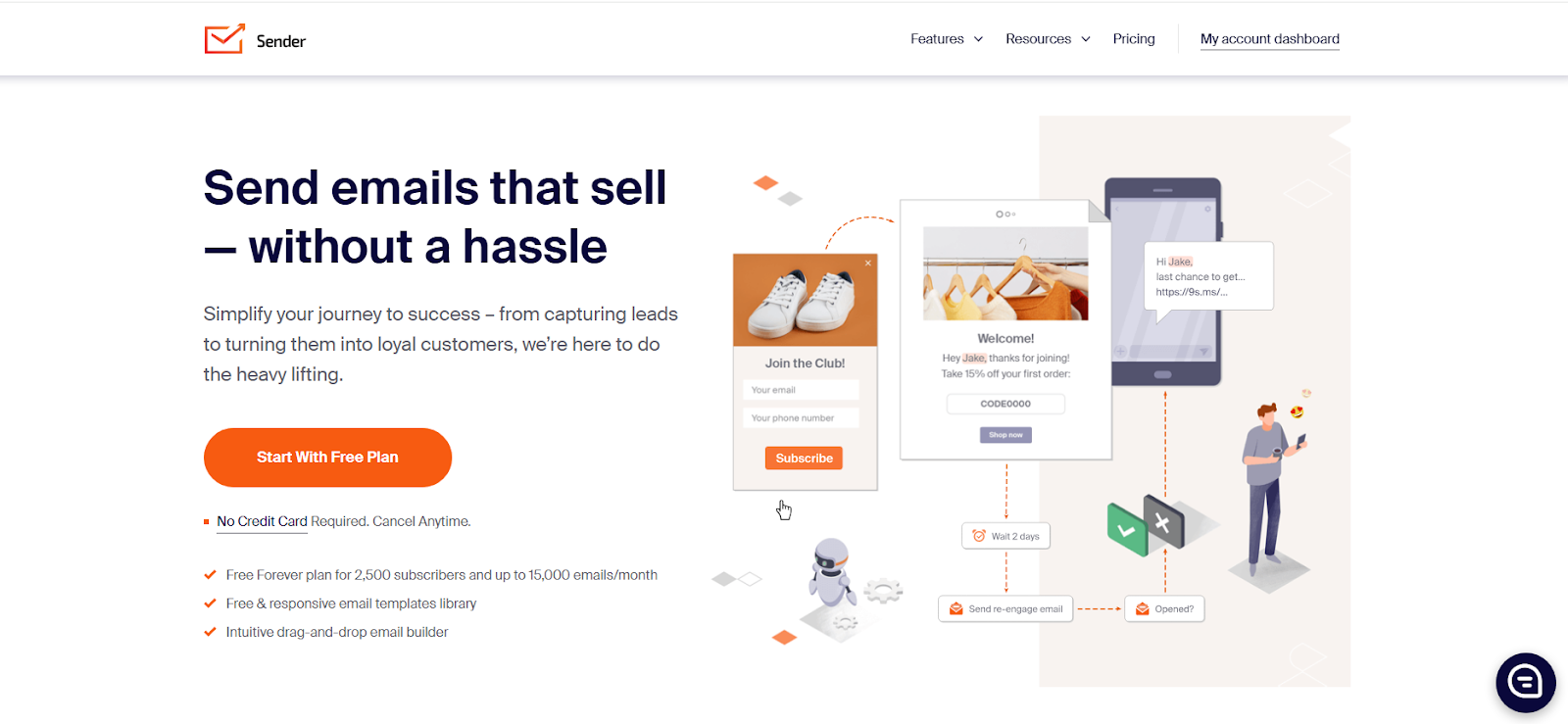
Best for startups and SMBs: Sender is ideal for small and growing businesses that need powerful email and SMS marketing tools that fit within their tight budgets.
Key features
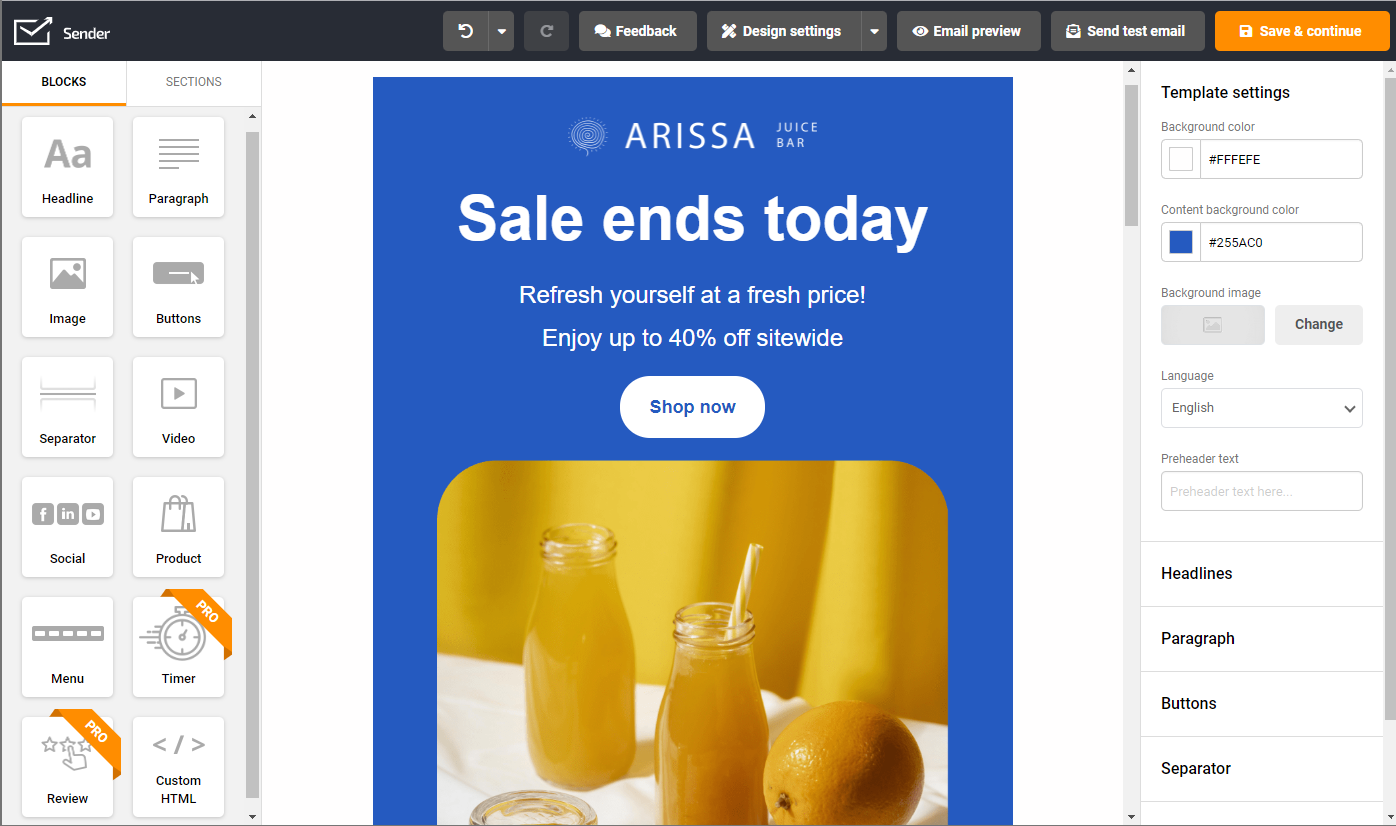
- Drag-and-drop email builder with responsive templates
- Email and SMS automation workflows
- Audience segmentation and personalization
- Built-in landing pages, popups, and signup forms
- Reports and analytics for tracking performance
- Integrations with Shopify, WooCommerce, and WordPress
Free account?
Yes — the Free Forever plan includes up to 2,500 subscribers and 15,000 emails/month, but it includes Sender branding and is limited to 1 seat.
Pricing
Sender has paid plans designed for scalability:
- Standard: Starts at $7/month, and adds SMS messaging plus A/B testing & experiments.
- Professional: Starts at $14/month with everything in Standard, plus advanced automation, advanced reports, priority support, and (on the pricing page) free SMS ($14/month).
- Enterprise: Custom pricing with everything in Professional, plus unlimited emails, phone support, and a dedicated success manager.
Pros and cons
| Pros | Cons |
| Generous Free Forever plan with automation, segmentation, and analytics | Sender branding on free plan |
| Affordable pricing for startups and SMBs | |
| 24/7 live chat and email support, even for free users | SMS campaigns available only on paid plans |
Summary
Trusted by over 180,000 businesses worldwide, Sender proves that you don’t need a big budget to run powerful, data-driven email and SMS campaigns. Its free plan gives you automation workflows, segmentation, and reporting tools that many competitors reserve for paid tiers. Small teams can create professional newsletters, automate campaigns, and even send SMS from one intuitive dashboard. As your business grows, you can easily scale into the paid plans for more advanced features and dedicated support.
4. Moosend
Best for email-first SMBs and scaling teams: Moosend is ideal if you want to build polished newsletters fast, segment audiences properly, and layer in automation without confusing pricing tiers or a steep learning curve. It’s a clean, intuitive platform that pairs an extensive template library with built-in generative AI and practical reporting.
Key Features
- No-code newsletter builder and a plug-and-play template library: Moosend sports an intuitive drag-and-drop editor and 110+ responsive email templates to speed up newsletter creation.
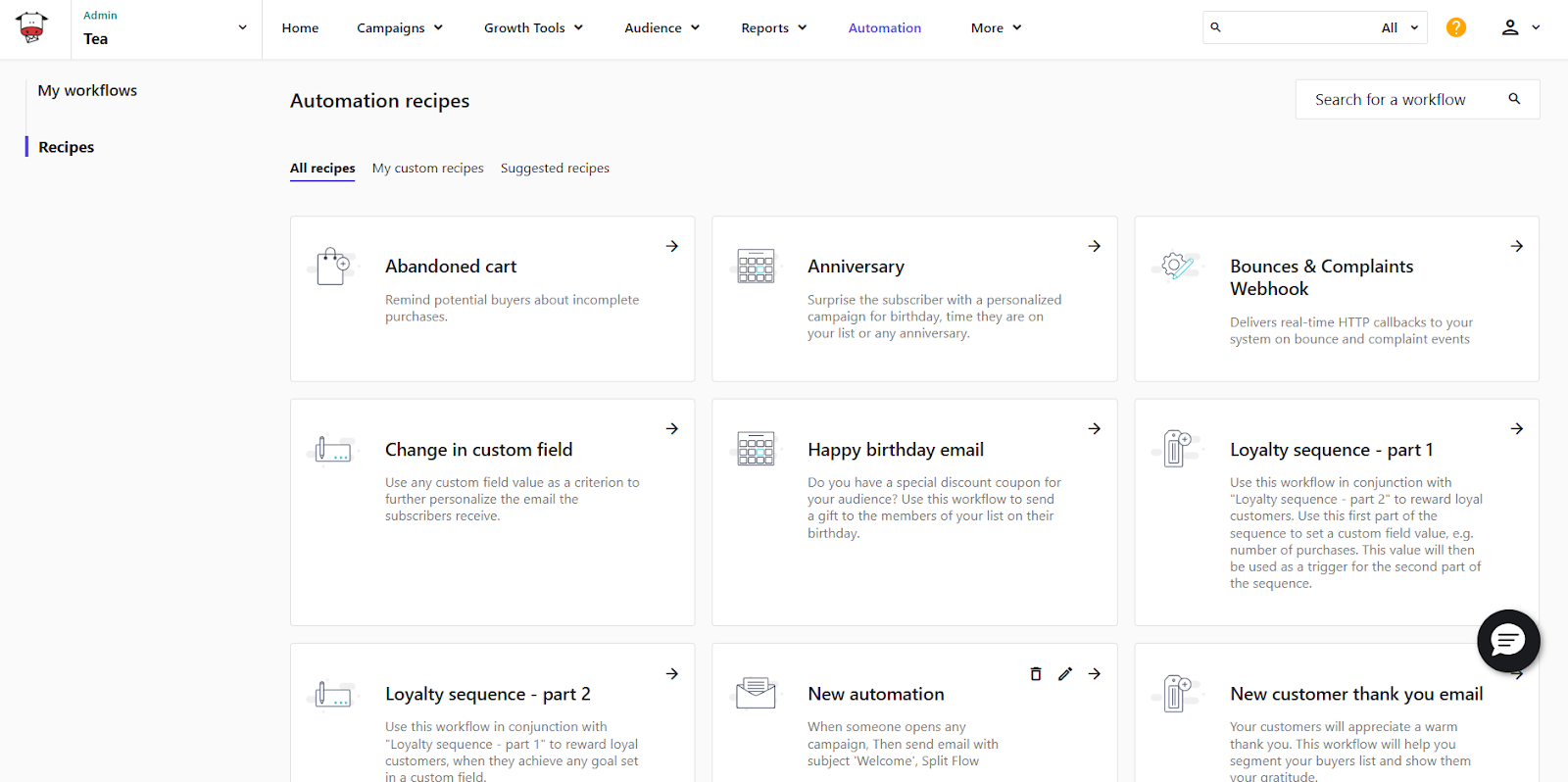
- Marketing automation (visual workflows): Build workflows using triggers-condition-action with branching logic in a visual builder. Choose a ready-made automation recipe, customize or use as-is, or create your own.
- Segmentation and personalization: Uses tags and custom fields for targeted sends and more relevant newsletters.
- Lead generation features: Moosend’s drag-and-drop landing page and forms builder comes with a set of pre-made templates that are optimized for mobile.
- AI Writer: The AI Writer helps with subject lines and body copy for emails, or landing page and subscription form copy.
- Tracking and analytics: Dashboards and campaign reports offer a full view of user activity (click activity, recipient activity), plus click-map style reporting.
- Integrations and marketing ecosystem: 43 native integrations listed, plus broad connectivity through Zapier.
- Customer support and learning resources: Moosend offers an extensive knowledge base, video tutorials, webinars, plus support via email and live chat.
Free account?
No. Moosend doesn’t offer a free-forever plan, but it does offer a 30-day free trial (no credit card required) that includes all of the platform’s core features.
Pricing
Moosend has three tiers: Pro, Moosend+, and Enterprise.
- The Pro plan starts at $9/month (500 contacts, unlimited email sends), and pricing scales based on unique contact count. This means that you get charged per contact, no matter how many lists they’re in.
- Moosend+ is a customizable plan where you can add enterprise features as add-ons (e.g. transactional emails, custom reports, dedicated account manager) and meet your business needs.
- The Enterprise plan includes all Moosend capabilities plus priority support.
The pricing for Moosend+ and Enterprise plans is custom.
Pros and Cons
| Pros | Cons |
| Email editor supports dynamic content blocks for more personalized newsletters. Segmentation and tagging allow precise audience targeting. AI writing tools assist with subject lines and body copy directly in the editor. | AI tools focus solely on copy. Native integrations are limited. No multichannel marketing features. |
Summary
Moosend is a newsletter platform for teams that are ready to invest in growth through email marketing without the growing pains. The platform is built for marketers who care about the look and feel of their newsletter campaigns as well as who receives them, when they’re delivered, and how content evolves over time.
What sets Moosend apart is its emphasis on core email marketing principles. Segmentation, automation, transactional emails, and reporting work together to encourage better habits. Marketers can send more targeted emails, reuse successful patterns, and refine campaigns based on engagement, not guesswork through its powerful reporting and analytics. There are also custom reports for users who need a more granular view of their efforts.
The platform also features robust automations. You can use the ready-made recipes that carry trigger-condition-action logic as-is or customize them to your liking. Or use the visual workflow builder’s branching logic to create your own from scratch.
Moosend deliberately focuses on email as a core growth channel. That makes it especially appealing for SMBs and scaling teams that want to professionalize their newsletters without inheriting enterprise-level complexity or unpredictable costs.
In short, the platform is a strong fit for businesses that see newsletters as an ongoing relationship with their audience and want a tool that supports that mindset.
5. Campaign Monitor
Best for personalized email campaigns: Campaign Monitor is Suitable for businesses focused on detailed personalization and intuitive email creation, though limited in form-building options.

Key features
- Intuitive user interface
- Data-based personalizations for your various audiences
- The Link Review tool checks links in the builder and notifies you if any are broken or missing

Free account?
No free-forever plan. Campaign Monitor offers a 30-day free trial, and trial sending is limited.
Pricing
Campaign Monitor offers three main plans: Lite, Essentials, and Premier. Pricing depends on your contact count — see the pricing page for current rates.
- Lite: entry plan. Includes core features and a monthly send limit tied to your subscriber tier (see pricing page for current limits and pricing).
- Essentials: includes unlimited email sends and priority level support (see pricing page for current pricing).
- Premier: highest standard plan (see pricing page for current pricing and included features).
You can also choose to pay per campaign if you are an infrequent newsletter sender.
Pros and cons
| Pros | Cons |
|---|---|
| Good variety of email templates | Very simple signup form builder with no prebuilt templates or targeting options |
| Email creator offers an easy way to personalize your content | Email creator offers only a basic desktop and mobile preview |
| Ability to tag campaigns for simplified analysis | Ability to export stats reports in PDF only |
| Reliable for deliverability | Doesn’t have a native landing page or website builder |
Summary
Campaign Monitor is a solid choice if you want to do email marketing.
The signup form and email builder may feel quite outdated, but they’re intuitive, so you won’t have trouble succeeding with your campaigns.
For advanced users, it offers useful reporting features, including tagging and click maps, that’ll let you get a quick overview of your results.
In-depth comparison: GetResponse vs. Campaign Monitor
6. Omnisend
Best for ecommerce brands: Omnisend is ideal for online brands who want an intuitive and powerful platform for growing their audience size, advanced automation for making sales on autopilot, and award-winning 24/7 support on every plan.

Key features
- Advanced automation to increase sales, including welcome series and cart abandonment
- Unlimited audience segmentation
- One-click integration with top ecommerce platforms
- Send SMS to your customers worldwide

Free account?
Yes, a free-forever plan for up to 250 contacts. It offers the same features as the paid plans, and 24/7 support. The main limitation is that you can send up to 500 emails/month.
Pricing
There are two paid plans, with pricing based on the number of contacts. There is also the option to purchase SMS credits.
Standard: Starts at $16/month for up to 500 contacts, 6,000 email credits/month, and unlimited web push notifications.
Pro: Starts at $59/month for 2,500 contacts, includes unlimited emails and web push notifications, advanced reporting, and bonus SMS credits equal to your monthly bill.
Pros and cons
| Pros | Cons |
|---|---|
| Intuitive platform for professionals and beginners | Large enterprise companies may need more advanced features |
| Advanced features without a luxury price tag | Advanced reporting is only on the Pro plan |
| Unlimited audience segments | More expensive than other tools |
| Award-winning 24/7 support on every plan | Does not have a native landing page or website builder |
Summary
Used by over 125,000 brands of all sizes, Omnisend is a popular email & SMS marketing tool primarily built for ecommerce. It offers an intuitive platform, a wide range of tools for growing your email list, engaging your audience, and increasing sales.
The free tier is packed with the same features as the paid plans and you can stay on it until you outgrow the contact limitation.
7. Kit
Best for creators and influencers: Kit is tailored for creators looking to monetize their audience with built-in commerce solutions and intuitive pop-up builders.

Key features
- Plain email creator
- Built-in commerce solutions for monetizing your audience
- Intuitive signup form creator

Free account?
Yes—you can start a 14-day free trial (no credit card required).
There is also a free Newsletter Plan for up to 10,000 subscribers. It includes unlimited email sends, unlimited forms and landing pages, and 1 basic visual automation with 1 email sequence. Free migration is not included on this plan.
Pricing
You can opt for one of two paid tiers with ConvertKit:
- Creator: starts at $39/month for up to 1,000 subscribers.
- Creator Pro: starts at $79/month for up to 1,000 subscribers and adds more advanced features for scaling your creator business.
Pros and cons
| Pros | Cons |
|---|---|
| Intuitive popup builder with several prebuilt templates and targeting options | Basic email automations |
| Built-in commerce solutions | Gets expensive once you grow |
| Focused on creators | Creator centric and lacks advanced email marketing tools |
Summary
If you are the creative type, Kit is a great tool for growing and monetizing your audience.
In terms of email marketing, its email creator is quite basic. It offers only several prebuilt templates, and you won’t find any advanced features (e.g., inbox preview, spam checker, dark mode preview) that are available on other platforms.
In-depth comparison: GetResponse vs. Kit
8. Constant Contact
Best for event promotion: Constant Contact is excellent for businesses that frequently host events, with tools for error checking and event promotions, despite having an outdated email builder.

Key features
- An intuitive drag-and-drop experience
- Resend emails to non-openers to improve engagement
- Email marketing automation features to send automated messages based on specific triggers
- Contact segmentation capabilities

Free account?
Yes – you can get a 30-day free trial.
Pricing
Constant Contact operates three pricing tiers for its email newsletter software, and like other tools, its pricing is based mostly on the size of your email list.
- Lite: 0-500 contacts for $12 per month with 10x the number of sends
- Standard: 0-500 contacts for $35 per month with 12x the number of sends
- Premium: 0-500 contacts for $80 per month with 24x the number of sends
If you prepay for 12 months, you can get a 15% discount. Nonprofits can get 30% off when they prepay for 12 months.
Pros and cons
| Pros | Cons |
|---|---|
| Email creator offers error checker and event promotion tools | Outdated email builder with limited customization |
| Subject line and preheader recommendations based on your past campaigns | No built-in stock photo library |
| Ability to import PDF into email | Popup form creator with limited editing options and no prebuilt templates |
| Built-in tools for event management | Basic landing page features and limited advanced automation |
Summary
Constant Contact offers a good variety of email marketing features, although they’re a bit outdated.
Those planning to use emails to promote their events will find that Constant Contact offers some useful tools, including polls and RSVPs, although they’re only available in the more expensive plan.
In-depth comparison: GetResponse vs. Constant Contact
9. MailerLite
Best for cost-effective solutions: MailerLite is great for small to medium-sized businesses seeking an affordable email marketing tool with good templates and an intuitive form builder.

Key features
- Advanced email creator
- Intuitive popup form builder
- Click maps and “opens by location” reports

Free account?
Yes—the free plan offers many features for businesses with up to 500 subscribers.
You can also get a 14-day free trial of the premium license.
Pricing
There are currently three premium tiers. Their pricing varies based on the included features and your email list size:
- Growing business: Starts at $10 per month for a list of up to 500 contacts and comes with essential email features and 24/7 email support
- Advanced: Starts at $20 per month for a list of up to 500 contacts and comes with more advanced features and 24/7 email and chat support
- Enterprise: Custom plan for businesses with lists above 100,000
Pros and cons
| Pros | Cons |
|---|---|
| Intuitive signup form and email builder | Signup form builder offers limited targeting options |
| Cost-effective | Sometimes slow and unresponsive email builder |
| Good email templates | Quite limited landing page builder |
Summary
MailerLite offers strong tools to grow and nurture your email list.
Its signup forms and email creator are advanced. However, the latter can sometimes be slow to respond.
It comes with ready-made templates that are modern and will work for most businesses.
In-depth comparison: GetResponse vs. MailerLite
Full software review: MailerLite review
10. Brevo
Best for multichannel marketing: Brevo is ideal for businesses wanting to integrate email marketing with other channels like SMS, WhatsApp, and social media.

Key features
- AI send time optimization (available on the Standard plan and above)
- Easily customizable email newsletter templates
- Marketing automation features available in higher pricing tiers

Free account?
Yes—you can send up to 300 emails per day on the Free plan. You can store up to 100,000 contacts.
Pricing
Brevo’s pricing tiers are Starter, Standard, Professional, and Enterprise. Plans are primarily defined by how many emails you send per month.
- Starter: best for single users starting with email and multi-channel marketing; includes from 5,000 emails per month.
- Standard: best for small businesses ready to automate and test campaigns; includes marketing automation, A/B testing, advanced email reporting, AI send time optimization, and landing pages (1 page included).
- Enterprise: custom price for companies with 1M+ contacts needing custom solutions and full data control.
Pros and cons
| Pros | Cons |
|---|---|
| Multichannel marketing capabilities | No signup form templates available |
| A lot of email templates, although somewhat outdated | Popups cannot be used to promote offer |
| Ability to add attachments to your emails | Email builder rather rigid, doesn’t let you easily add emojis or videos |
Summary
If you’re trailing email newsletters and have little experience, Brevo is a great option at a good price. But like most other tools featured in this guide, when you need to take your campaigns to the next level, you might be raising a business case for an extra budget.
11. AWeber
Best for small businesses with limited design resources: AWeber Offers a smart designer tool that helps create emails based on your website, making it easy for small businesses to start email marketing.

Key features
- Use Aweber’s “Smart Designer” to create well-designed emails
- Drag & drop email creation; no coding knowledge required
- Pre-built email newsletter templates
All you need to do is enter your website address and several suggestions appear after a few seconds of analysis.

Free account?
Yes—AWeber offers a Free plan. It supports up to 500 subscribers and 3,000 emails per month, and includes a single workflow automation (or autoresponder campaign). It’s a good starting point, but you’ll need to upgrade if you want more advanced features (like split testing), higher limits, or branding removal.
Pricing
AWeber has three paid tiers:
- Free: Up to 500 subscribers and 3,000 emails per month, with a single workflow automation (or autoresponder campaign).
- Plus: Paid plan starting at $30/month (or from $20/month billed annually) for 0–500 subscribers. It adds advanced features (such as split testing/advanced analytics), includes branding removal, and expands limits significantly.
- Unlimited: For lists around 100,000+ subscribers; pricing is custom (contact sales).
Pros and cons
| Pros | Cons |
|---|---|
| Decent email builder that comes with prebuilt stock photos | Email builder lacks more advanced features |
| Good landing page templates | Outdated email templates |
| Smart designer that helps you create your email based on your website | No transactional emails |
Summary
The smart designer is a major draw to AWeber for small businesses that don’t have a dedicated graphic designer or time to allocate to playing around with templates.
The sliding scale subscriber model can get fiddly when growing an email audience and constantly changing payment models, though.
In-depth comparison: AWeber alternatives and competitors
GetResponse vs. AWeber feature-by-feature comparison
12. HubSpot
Best for small business owners & bloggers: HubSpot’s Newsletter Builder is best for small businesses and content creators who want to take control of their audience. With this Free Newsletter Builder, they can create delightful email newsletters to keep contacts engaged.

Key features
- There are pre-made designs you can use as a starting point.
- You can see how many people opened your email and clicked on links
- You can drag and drop stuff to design your newsletter. No coding needed
HubSpot’s Newsletter builder also lets you personalize your email newsletters without having to do it individually. Your newsletter will look nice whether someone’s reading it on their phone, tablet, or computer.

Free account?
HubSpot offers free access to the newsletter builder tool (no credit card required). You can create newsletters using templates and a drag-and-drop editor, and track performance. Email sending limits depend on your subscription and are shown in your account/pricing documentation.
Pricing
Free Newsletter Builder is a part of Marketing Hub, and HubSpot offers the following plans:
- Marketing Hub Starter: starts at $20/month and includes 1,000 marketing contacts (see pricing page for current seat and contact details).
- Starter Customer Platform: starts at $15/month per seat billed annually (per HubSpot’s Starter Customer Platform page). It bundles multiple Starter products (including Marketing Hub Starter with 1,000 marketing contacts).
- Marketing Hub Professional: $800/month on the annual plan, includes three core seats by default, and has a one-time onboarding fee of $3,000 (per HubSpot’s pricing guide).
Pros and Cons
| Pros | Cons |
| Even if you’re not tech-savvy, you can create professional-looking newsletters. | While easier than coding, there’s still a bit to learn about using the tool effectively. |
| Saves hours compared to designing from scratch or using complex tools. | You might need to upgrade for more advanced features. |
| Makes your emails feel more personal, which can boost engagement. | While there are templates, you might find them restrictive if you want something very unique. |
Summary
HubSpot’s newsletter builder is a handy tool for solopreneurs and small business owners who want to stay in touch with their audience without spending hours on tech stuff. It’s like having a design assistant who can make your emails look good on phones and computers.
The drag-and-drop editor means you can put together a newsletter quickly, even if you’re not tech-savvy. There are templates to get you started, and you can personalize emails with things like the reader’s name without doing it manually for each person.
You can see how your newsletters are doing. The tool shows you stuff like how many people opened your email or clicked on links. This helps you figure out what your audience likes, so you can do more of that.
The tool is not just for one type of business. Whether you’re a blogger, consultant, online course creator, or running a local shop, you can use it to keep people updated on what you’re up to.
The newsletter builder is part of HubSpot’s bigger set of tools, which is nice if you’re using other HubSpot tools. But even if you’re not, it can still be useful on its own.
While it’s pretty user-friendly, there’s still a bit to learn about using it well. And if you want some of the fancier features, you might need to pay for an upgrade. But for most solopreneurs, the basic features are enough to create newsletters that look professional and help keep your business on people’s minds.
HubSpot is a solid tool that can help you stay connected with your audience without wasting all your time. Just remember, having an easy-to-use tool doesn’t mean you should flood people’s inboxes. Keep your newsletters valuable and your audience will look forward to hearing from you.
All the must-have features? Try GetResponse
From automation and segmentation to AI tools and unbeatable support, GetResponse offers everything you should expect in modern newsletter software at a competitive price.
FAQ: Choosing the best email newsletter software
Here are quick answers to the most common questions people ask when comparing email newsletter platforms.
Which email newsletter platform is best for small businesses?
The best newsletter platform for small businesses is one that fits your list size and budget while covering the basics: an easy drag-and-drop email builder, segmentation, automation, templates, and solid reporting. If you also need landing pages, signup forms, and popups, choose an all-in-one email marketing platform rather than a newsletter-only tool.
Which email marketing tool is best for sending weekly newsletters?
For weekly newsletters, prioritize deliverability, a fast email editor, reusable templates, scheduling, and analytics (opens/clicks). If you plan to grow, make sure the tool supports automation (welcome series, onboarding, re-engagement) so you can scale without extra manual work.
What tool should I use to create an email newsletter?
Use a newsletter tool with a drag-and-drop email builder and ready-made templates, so you can design quickly without coding. Bonus points if it includes an AI writing assistant for subject lines and copy, plus image blocks, buttons, and mobile-friendly layouts.
What should I look for in an email newsletter platform?
Look for transparent pricing, list management (tags/segments), automation workflows, template library, integrations (Shopify, WordPress, Zapier, HubSpot), and clear reporting. If you’re switching providers, also check migration support and customer support quality.
How do email newsletter tools price their plans?
Most newsletter software prices by contact count, but it matters how they count contacts: some charge for all stored contacts, while others charge only for active/marketable subscribers. A few providers price by monthly email volume, which can get expensive if you send frequently.
Are there free newsletter platforms that still look professional?
Yes—many providers offer free plans or free trials. Free plans are best for small lists and basic sends, but they often include branding, limited automation, and sending caps. If you want a more “pro” look, check whether the free tier allows custom branding, templates, and a custom domain for landing pages.
What’s the smartest way to compare newsletter platforms and pricing?
Start with your real needs (weekly newsletters only vs. newsletters + automation + landing pages), then compare (1) price at your current list size, (2) price at your next milestone (e.g., 1,000 or 5,000 contacts), and (3) which features are locked behind higher tiers (automation, A/B testing, advanced segmentation, support).
Conclusion
The raft of options for newsletter software tools goes beyond this top 12, making finding the best email marketing platform a daunting task.
Rather than starting a trial and setting up accounts with these (and any other email platform), we’re confident you’ll love GetResponse.
For example, since using GetResponse, Submission Technology reports a 31.14% unique open rate, a 7.31% unique click-through rate, and a 99.2% deliverability rate.
Gemma Seager, Team Leader, Email & Push Notifications at Submission Technology, highlights contact list segmentation and regular A/B testing:
“Contact list segmentation and regular A/B testing allow us to check what really resonates with specific groups of contacts. We collect and analyze data and act on it during the next campaigns.”
You can read more success stories like these:
